Built with and for
Asset owners
Delivery partners
Tier one contractors
Civil crews
Locators and spotters
Local councils
Regulators
SWMS, in real time
Interactive SWMS supporting your safety based on the actual work you are getting a permit for.
Your SWMS is linked to the dig permit and the work method. It activates on what the crew is actually doing, at the moment they are doing it.
What the permit knows
You are pot holing HV power
Method, asset class, clearance and rating came from the mud map and the risk assessment. That combination is what decides which of your SWMS clauses apply — not a tick on a cover sheet.
Method
Non-destructive digging
Asset
HV underground power
Clearance
400 mm horizontal
Rating
C · High
The SWMS is now activated on the work being done, in real time.
SWMS clause E7 · initial to proceed
You have signed the SWMS saying you will be using Electrical Insulated Glove Kit — Class 3 26.5kV
Initial here to confirm you will be using these today.
Named in your SWMS
Electrical Insulated Glove Kit
Class 3 26.5kV
Tested 14 May 2026 · expires 14 Nov 2026
Initial here
I have this kit on site and I am using it for this task.
RI
If the kit is not on the truck, they say so and the permit routes to the supervisor. The crew cannot initial their way past equipment they do not have.
Clause by clause, not cover to cover
The crew is shown only the clauses their work triggered, with the plant and PPE each one names.
Named equipment, not a category
Your SWMS names a specific kit. The permit asks for that kit, and reads its test date from your register.
Initialled at the point of work
Timestamped against the permit with the person's name, so the record shows what was in use on the day.
Where compliance belongs
Safety and excavation compliance shouldn't just be a slide at head office
It shouldn't live in a monthly toolbox talk either. It belongs in the hands of the person standing over the trench, at the moment the decision is made.
Not the crew's job to interpret
A 130 page BYDA response is not a field document
Seven authorities, seven legends, seven sets of rules, delivered as a PDF. It is not reasonable to ask a crew to read that on a phone in the rain and correctly work out the risk. PermitSnap does the reading.
Seven authorities respond separately, each with its own legend and rules
Critical assets are named in the detail, not on the cover
PermitSnap reads the response and calculates the risk category
The crew answers questions, not a document
Get ahead of it
Stop the incident instead of reviewing it
The industry is very good at talking about a strike after it happens. PermitSnap intervenes before it does — the permit will not clear while the conditions for an incident are present.
Incident review
→
Intervention before the strike
Toolbox talk next month
→
The control at the moment it matters
Compliance slide at head office
→
Compliance in the crew's hand
One standard
No relearning a permit process every time you get a new client
Today each contractor writes its own form and its own methodology. A crew moving between principals faces a different permit every time, and an asset owner reviewing three contractors reads three different documents. PermitSnap makes the permit and the method industry standard, so the only thing that varies is the site.
Today
Every company for itself
Every contractor writes its own permit form and its own methodology
A crew moving between principals relearns the process each time
Asset owners review three contractors and read three different permits
Criteria sit in a PDF nobody opens standing over a trench
Nothing is comparable, so nothing can be audited across the industry
With PermitSnap
One method, every site
One accredited permit application the whole industry recognises
No relearning the process for a new client — the method does not change
Asset owners see their own criteria answered in a consistent format
Criteria become questions in the app at the moment they matter
Every permit is comparable, auditable and on the map
Who's on board
A standard only works if the whole chain is on it
PermitSnap reaches crews through the platforms they already run their day on, the principals who set the programme, and the councils who own the ground it happens in.
Through collaboration, we reduce risk and create better outcomes.
We all play a part. We all share the responsibility.
Channel 01
Software platforms crews already use
Crews run their day out of a job management platform. Rather than adopting a second app, the permit is raised from inside the tool they already open each morning.
Integration targets
Channel 02
Tier one and asset owners
The principals who set the programme mandate the permit down their contractor base. One decision at the top puts hundreds of crews on the standard.
Adoption targets
Channel 03
Local councils
Councils own the ground the work happens in. We digitise their plans and give them a permit record for their community, and their criteria reach every crew working in their area.
Council partners
Organisations shown are integration and adoption targets across the go-to-market. Names and marks remain the property of their owners; none should be represented as a commercial relationship until formally signed.
The criteria engine
The right requirements. The right guidance. All in one place.
PermitSnap brings asset owner requirements, project rules and industry knowledge together in one intelligent platform.
The smarts are already built in — guiding you through each step, helping you make safer decisions, capture the right evidence and get the job done effectively.
Asset owners stay informed. Project teams stay connected. And the people doing the work have the information and support they need, right there in their hands.
Everyone plays a part. PermitSnap brings it all together.
1
Plug in
Asset and utility owner criteria
Each owner publishes what must be true near their assets. The permit enforces it without the crew needing to know whose network they are near.
Clearance and exposure rules by asset class
Mandatory locating and pot holing
Named critical assets that escalate automatically
2
Overlay
Delivery partner customer safety criteria
The principal contractor adds their own safety requirements on top, so one permit satisfies both the owner and the programme.
Traffic management and public interface
Crew competency and induction checks
Client specific hold points
3
Output
One combined risk category
Both rule sets are evaluated against the work being done. The permit returns a category and the controls it demands.
Controls attached automatically
Signature routing set by category
Evidence requirements made mandatory
Risk categorisation
Calculated by the criteria — not by the crew
The category sets who signs, what evidence is mandatory, and whether work can start at all.
Level 1
Standard
No known assets in the excavation envelope. Standard controls apply.
Team leader signs
Level 2
Elevated
Assets located nearby. Pot holing and clearance evidence mandatory.
Supervisor signs
Level 3
High
Crossing or working within the clearance zone of a live asset.
Asset owner signs
Level 4
Critical
Critical asset in scope. No work proceeds without a spotter present.
Owner and spotter sign
The asset owner portal
Your rules, pushed to the crew at the point of work
You publish the controls once. Every permit near your network carries them, and every change is versioned so an old permit is still auditable against what applied at the time.
Asset classes
Your BYDA legend, as the taxonomy
The classes on your plans, including the Critical distinction. Controls attach to each class rather than to a generic pipe.
Controls
Separation, potholing, crossings
Set the numbers per class. A crew's risk category is calculated against your values, not a national average.
Versions
Published sets are immutable
Change a value and you get a new version. Permits issued earlier stay auditable against what actually applied.
Notification distance
You decide what reaches you
Per class. Anything drawn inside it texts your duty contact before the crew mobilises.
Involvement
Co-sign, standby, spotter, locating
Say what your presence requirement is by class, and the permit will not clear without it.
Audit trail
Cannot be edited or deleted
Every change to controls, classes and permits — who, when, what moved. Including by us.
Nothing costs you a licence
The asset owner portal is free to the asset owner, forever
Contractors pay per permit. You are the reason the evidence exists, so you are never the one being billed for it — and your logins are not provisioned until you agree to proceed.
On site
The permit is completed where the work happens
Each step proves itself as it is done. Nothing is typed from memory back at the depot.
01
Scan the locator barcode
Scan the barcode on the locating equipment. PermitSnap checks the calibration record and blocks the permit if it is out of date.
What it proves
The equipment was fit to use on the day
02
Upload the USI number
Enter the USI to confirm a current locating ticket exists for this address and this window of work.
What it proves
A valid locating ticket covers the site
03
Screenshot the map
Capture the site map as it stands when the permit is raised, so the base everyone works from is fixed.
What it proves
What was known before the crew touched anything
04
Draw on the assets
Mark the located assets directly onto the captured map — position, class and depth as found on the ground.
What it proves
What the crew located, not what a plan claimed
05
Add pot holes as assets
Drop each pot hole on the map and take the photo. The pot hole becomes an asset record, not a note.
What it proves
Depth and service exposed, verified by photo
06
Video the set-up
One walk-through video covering the site set-up, the pot holes and the desired alignment, attached to the permit record.
What it proves
The site as it stood at the moment of approval
07
Route for signature
The category decides who signs. The permit goes to them with everything already attached, and returns signed.
What it proves
Authority to work, from the right party
Marking up the ground
Screenshot the map. Draw the assets. Prove the pot holes.
The crew captures the map as it stands, draws the located assets onto it, then drops each pot hole as a real asset with a verified photo behind it. Every pot hole added here becomes a record on the Subsurface map.
The map is captured, not described
A screenshot fixes the base everyone reviews against — no argument later about what was showing.
Assets are drawn where they were found
The crew marks the real position, which is frequently not the plan position.
Pot holes become assets
Each carries its photo, depth and the service exposed, and publishes to the Subsurface map.
Alignment is drawn before the bore
The desired alignment sits on the same map as the located assets, so any crossing is visible to the approver.
Fed by Subsurface
Have you at least found these?
Subsurface already knows what is recorded under that address. The permit lists those assets back and asks the crew to confirm each one has been located before the category can be cleared.
Telstra conduit
Recorded 0.7 m to crown · pot holed Aug 2026
Located
Icon Water DN300 main
Critical asset · clearance zone applies
Located
Evoenergy LV cable
Recorded within 3 m of the alignment
Not found
NBN conduit
Route crosses the proposed bore
Located
An asset the crew cannot find is not a missing checkbox. It is a stop, escalated to the asset owner.
Data capture
The piece that has been broken for so long now comes together
Permits have always assumed the evidence would turn up somehow. It rarely did. CivilSnap is the capture side of the same system — it asks for each artefact at the point it is needed, stamps it as it is taken, and feeds it straight back onto the permit.
Capture all your artefacts — photos, permits, bore logs, rock claims and pot holes — in one app.
Every artefact the permit needs
The app names the shot rather than leaving the crew to guess
Stamped as it is taken
Address, coordinates and time burn into the frame at capture
Checked before they leave site
A failed shot comes back while the hole is still open
Straight onto the permit
No emailing photos to the office and hoping they land
Published to the Subsurface map
Once the permit is signed, the record helps the next crew
Pot holing
A pot hole is only proof if the photo proves it
Tap the map where the hole is, take the shot in the app, and the pot hole becomes an asset on the permit. Not a line in a comment box — a positioned record with a depth, a service and a photograph behind it.
01
In the app
Tap the map where the hole is
The pot hole is placed on the same captured map the assets were drawn on, so its position is fixed relative to everything else.
02
In the hole
Tape against the service
Frame the exposed service with the tape measure readable. The same framing every crew, every time, so the depth can be trusted by whoever reads it next.
03
As it is taken
Stamped at capture
Address, coordinates and the time burn into the frame as the shutter fires. Nothing is added afterwards and nothing can be back-dated.
04
Before it attaches
Checked, then attached
The photo is checked for the measure, the subject and a GPS match to the job. It attaches to the permit as a pot hole asset, not a loose image.
What the photo must carry
The exposed service, clearly identifiable by type
A tape measure readable in frame, against the service
Enough surrounds to place the hole in the street
Address, coordinates and time stamped at capture
A GPS match to the permit's job location
A shot that misses any of these comes back for a re-shoot while the hole is still open — not a week later when the trench is closed.
On the permit record
Pot hole PH-03 · 14 Woodcock Dr
Asset exposed
Telstra conduit
Depth to crown
0.7 m
Surface
Nature strip
Captured by
Rowan Isaacs
AI check
Passed
Thu 13 Aug 2026 · 15:27
Attached to the permit, and published to the Subsurface map once the permit is signed.
Site risk scan
Take a video of the site. The AI engine scans it for risk.
Walk the site with the camera running. The engine reads what is above and around the excavation, not just what is beneath it, and raises the hazards a crew focused on the trench can miss.
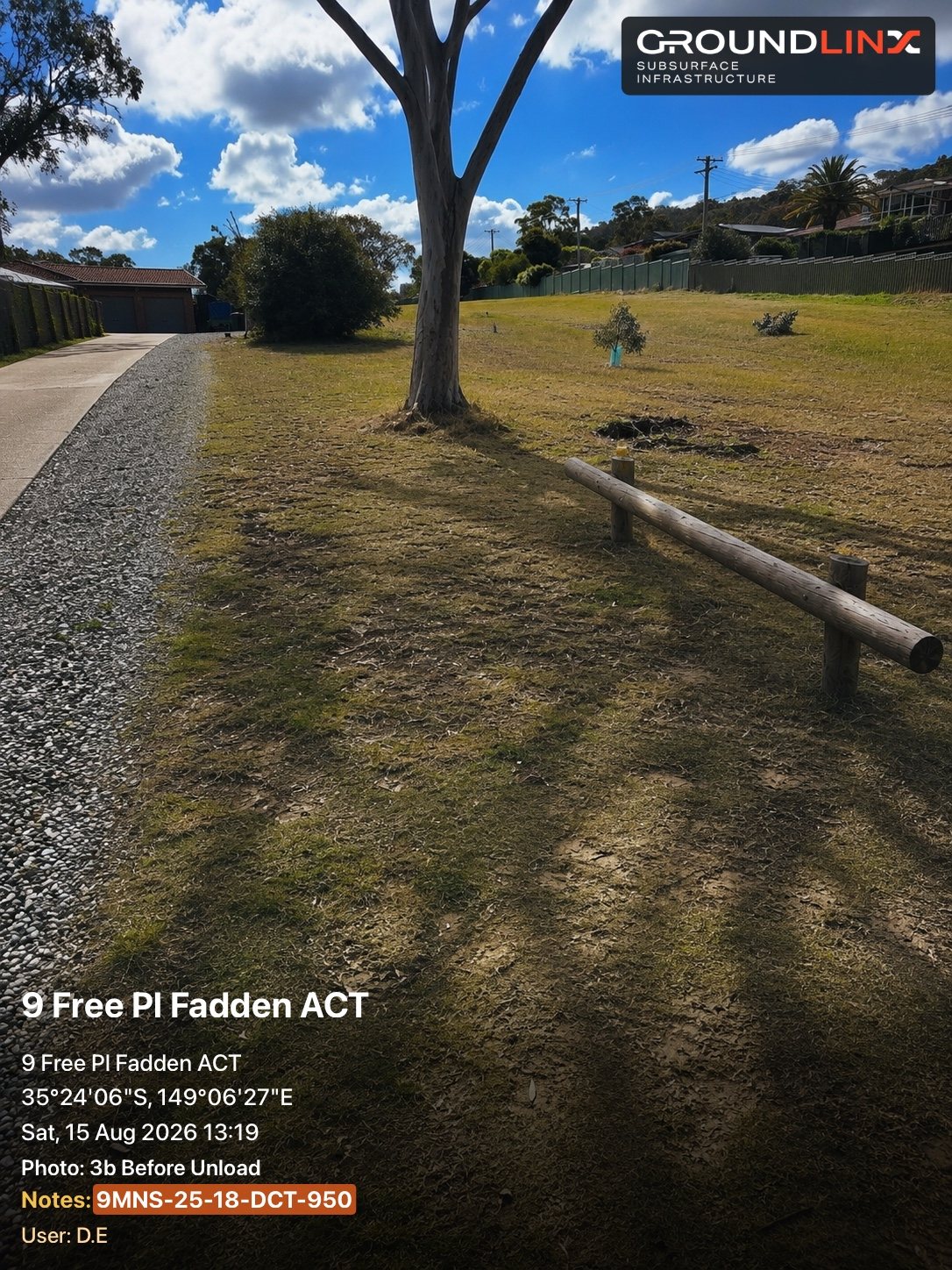
Tree protection zone
Detected
A mature tree sits within the work area. The permit asks whether the excavation falls inside the structural root zone and applies the no-dig radius.
Fixed obstruction
Detected
Timber barrier crossing the site. The permit asks how plant will access the alignment and whether the barrier must be removed and reinstated.
Heritage impact
Flagged
The site sits inside a mapped heritage overlay. The permit requires confirmation of the heritage approval before ground is broken.
Public and pedestrian access
Detected
Footpath in use beside the work area. Exclusion fencing and a pedestrian route are asked for.
Ground and access conditions
Noted
Slope and surface type recorded from the video and attached to the permit as context for the approver.
The engine assists the crew. It does not replace the assessment — every detection still needs a person to accept or dismiss it.
Approval flows
The permit finds whoever has to sign it
The criteria decide the signatures. If the work needs the asset owner, the permit routes to them. If it needs a spotter, the spotter signs on the permit itself. Nobody chases a signature by phone and nobody starts without one.
Team leader
Signs every permit as the person accountable on the ground for the work about to start.
Triggered when
Always
Supervisor
Reviews the located assets, the pot hole evidence and the alignment before authorising.
Triggered when
Level 2 and above
Asset owner
The permit routes to the owner of the asset in scope with the evidence attached. They approve, add conditions, or refuse.
Triggered when
Work in an owner's clearance zone
Spotter
Where a spotter is required, that spotter signs on the permit itself — accepting the obligation, not just being named on a form.
Triggered when
Owner or category requires a spotter
Crossing
You agree to watch the drill head pass
Approving a crossing is not a tick. The signatory accepts a stated obligation to observe the drill head pass the asset, and that acceptance is recorded against their name.
On the record
Named obligation, timestamped
Escalation
An asset that cannot be found stops the job
If Subsurface says an asset is there and the crew cannot locate it, the permit does not clear. It escalates to the asset owner rather than proceeding on assumption.
On the record
Escalation and owner response
Conditions
Approval can come with conditions attached
An owner can approve with added controls — hand dig only, spotter present, restricted hours. The conditions travel with the permit to the crew.
On the record
Conditions shown on the permit
Remote permit sign-off
The client walks the site without leaving the office
Add the client representative to a video call from inside the permit. They see the set-up, the pot holes and the alignment live, ask what they need to ask, and sign. The recording saves straight to the permit record.
No waiting on site for a representative to drive out
The approver sees the actual set-up, not a description of it
The call recording is evidence, attached to the permit forever
Attached to permit PS-4471
Locator calibration · in date
Verified
USI locating ticket
Verified
Site map with assets drawn
Attached
Pot hole photos · 4 of 4
Verified
Set-up and alignment video
Attached
Asset owner sign-off · Icon Water
Signed
Spotter acceptance
Awaiting
Every item is timestamped and attributed. The permit cannot be issued while a mandatory item is short.
The signed permit
It lives on the Subsurface map as public record
A permit that closes in a filing cabinet protects nobody. A signed PermitSnap permit publishes to the Subsurface map with its pot holes, its located assets and its alignment — so the next crew on that street inherits what this one proved.
The next crew
Inherits what this one proved
The pot holes, the located assets and the alignment are already on the map before they mobilise.
The asset owner
Sees who worked near their network
Every permit near their assets, with the evidence and the signatures behind it.
The council
Holds a record for their community
What was approved, where, when and by whom — in a format that is the same for every contractor.
The regulator
Can audit a consistent record
One permit standard means work across companies and years is genuinely comparable.
For asset owners
You know your assets. Put your rules in the crew's hands.
Asset owners have the deepest knowledge of what is in the ground and the strongest interest in protecting it. PermitSnap takes that knowledge out of a PDF nobody opens on site and turns it into the questions the crew must answer before the machine starts.
Collaboration, not enforcement. Civil crews want to build safely. Give them the criteria at the point of work and they will meet it.
Publish your criteria
Your criteria, enforced at the trench
Not a document you hope was read. Questions the crew must answer before the category clears.
You are told before, not after
Work near your network reaches you at permit stage, with the evidence attached.
Your assets get better records
Every pot hole near your network becomes a verified depth and position you did not have to fund.
A consistent format across contractors
Whoever is digging, the permit you review looks the same and answers the same questions.
The asset owner portal
Every screen your team will use
From the alert that wakes you at 6am to the audit trail that proves what you required and when. Nine screens, no training deck.
Alert
Dashboard
Asset classes
Versions
Requests
Audit trail
Review
Add a condition
My network

01 · Alert
How they find out
A permit is raised on your network at 6:41am. Before anyone opens an inbox, the authoriser has the location, the asset at risk and the category on their lock screen.
Pushed the moment a permit touches your asset
Category, clearance and crew visible without unlocking
Approve, query or call from the notification
Mobile · lock screen
Alert
Dashboard
Asset classes
Versions
Requests
Audit trail
Review
Add a condition
My network
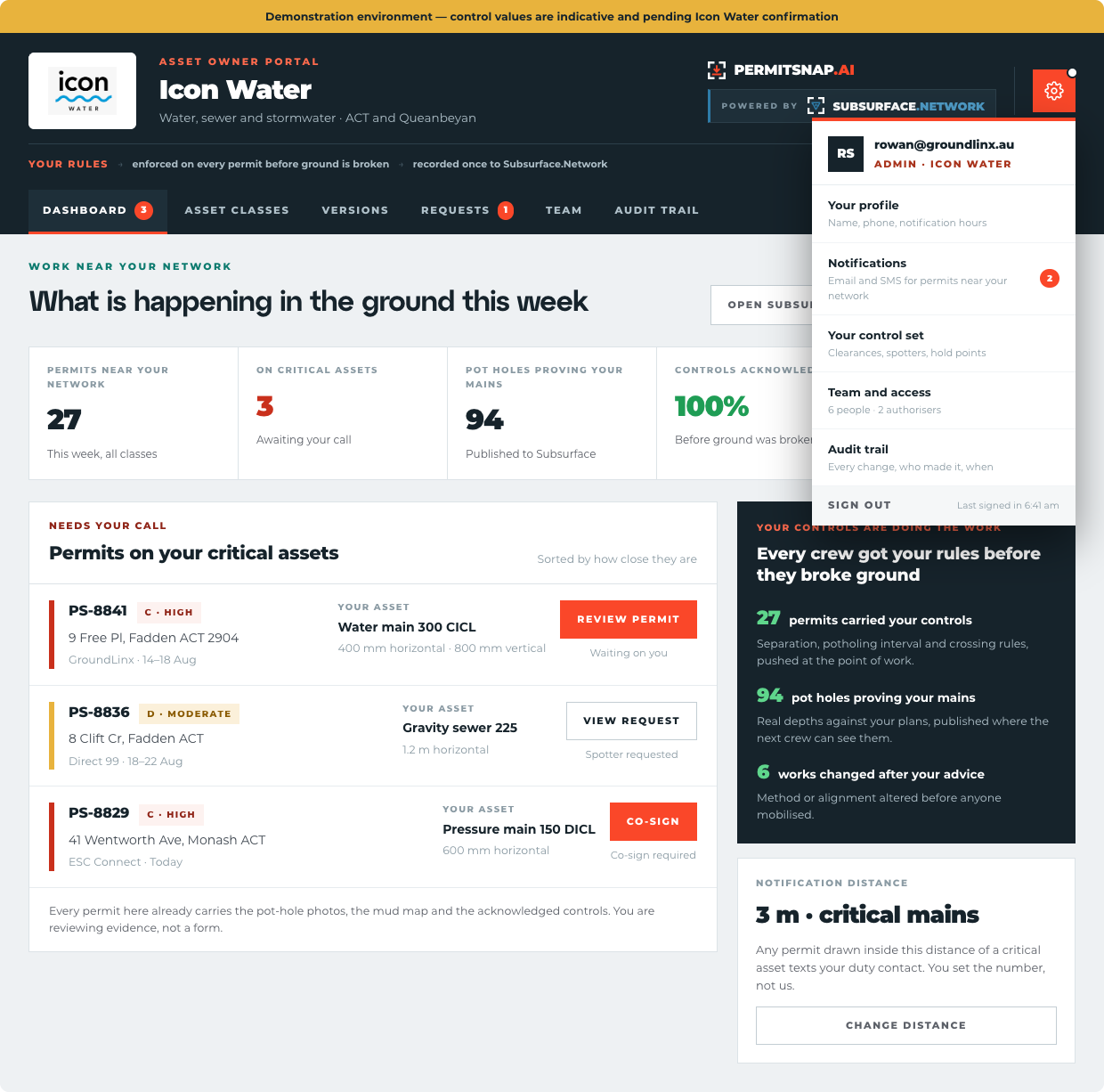
02 · Dashboard
Everything on your network today
One screen for every permit raised against your assets — what stage each is at, which need you, and which are already working.
Live count of permits by category
The ones waiting on your co-sign, surfaced first
Filter by asset class, contractor or suburb
Desktop
Alert
Dashboard
Asset classes
Versions
Requests
Audit trail
Review
Add a condition
My network
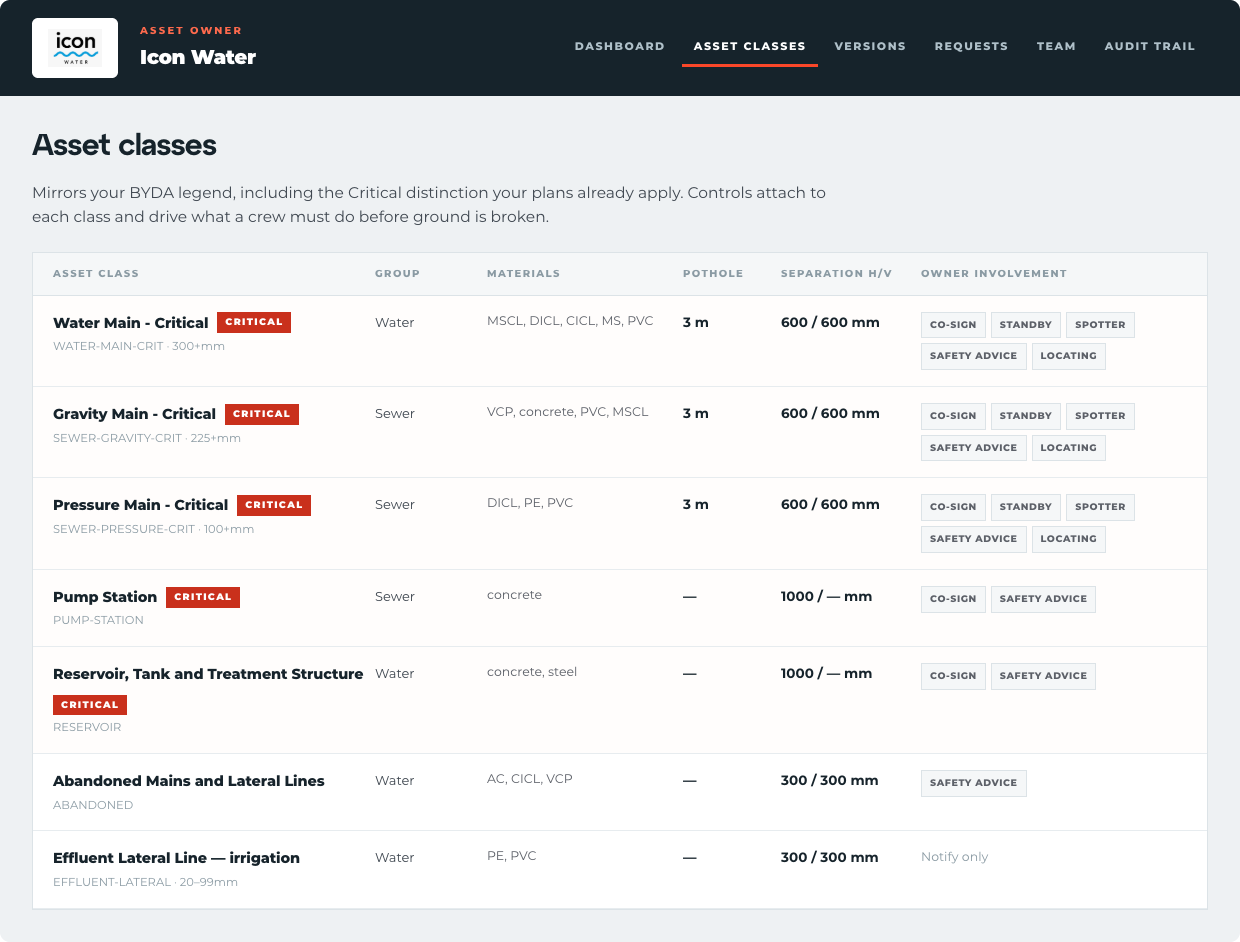
03 · Asset classes
Your rules, per asset class
Set the clearance, the method restrictions and the hold points for each class of asset you own. The crew never sees a rule that does not apply to them.
Clearances and exclusion zones per class
Methods you allow and methods you do not
Conditions that trigger a spotter or a hold point
Desktop
Alert
Dashboard
Asset classes
Versions
Requests
Audit trail
Review
Add a condition
My network
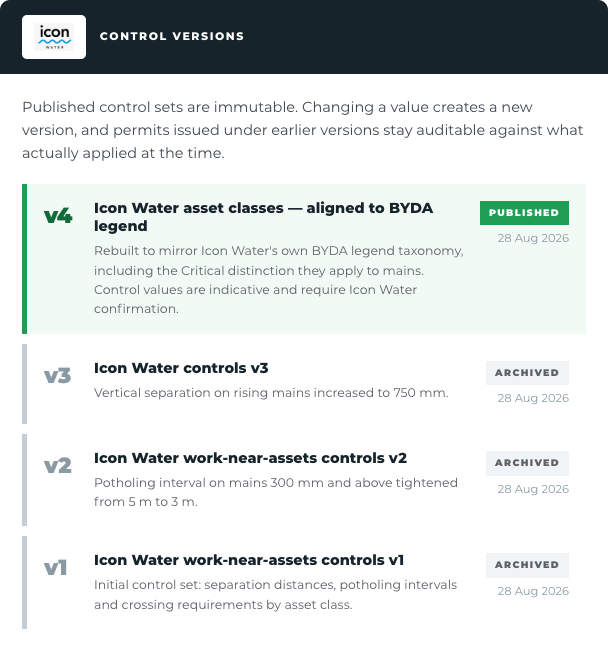
04 · Versions
Control versions
Every change to your control set is versioned. Permits stay bound to the version that was current when they were signed.
Who changed what, and when
Permits reference the version they were issued under
Roll forward without invalidating live permits
Desktop
Alert
Dashboard
Asset classes
Versions
Requests
Audit trail
Review
Add a condition
My network
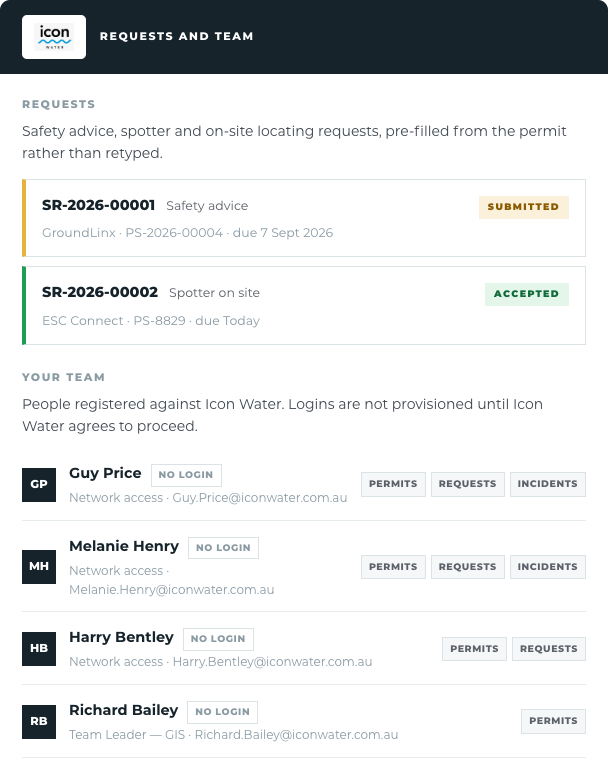
05 · Requests
Requests and team
Safety advice, spotter and locating requests arrive pre-filled from the permit rather than retyped. Contacts are registered against the asset class they cover.
Requests carry the permit, the site and the asset
Route to the right person by asset class
Response time recorded against the permit
Desktop
Alert
Dashboard
Asset classes
Versions
Requests
Audit trail
Review
Add a condition
My network
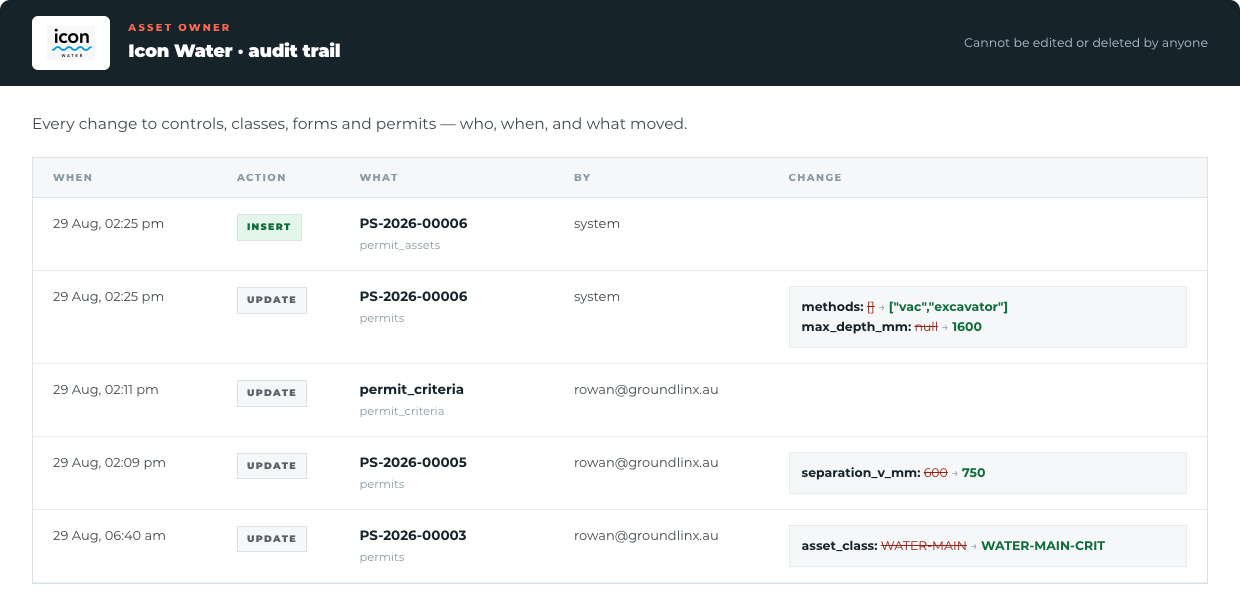
06 · Audit trail
Audit trail
What you required, when you required it, and what the crew did about it. One immutable record per permit.
Every state change timestamped and attributed
Photos, mud map and signatures locked together
Exportable for an incident investigation
Desktop
Alert
Dashboard
Asset classes
Versions
Requests
Audit trail
Review
Add a condition
My network
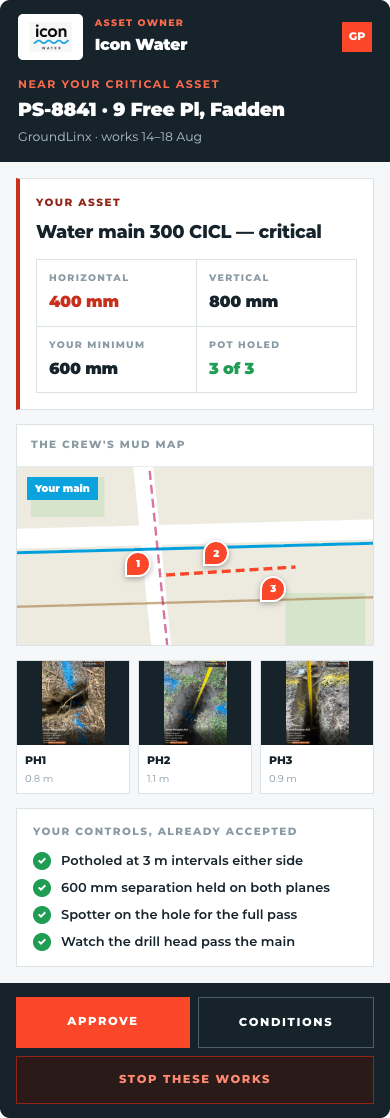
07 · Review
Review a permit in the field
An authoriser away from a desk sees the same evidence as the office: the mud map, the pot hole depths, the photographs and the category that was calculated.
Full permit on a phone, not a PDF attachment
Evidence in the order you need to judge it
Co-sign or send it back with a reason
Mobile
Alert
Dashboard
Asset classes
Versions
Requests
Audit trail
Review
Add a condition
My network
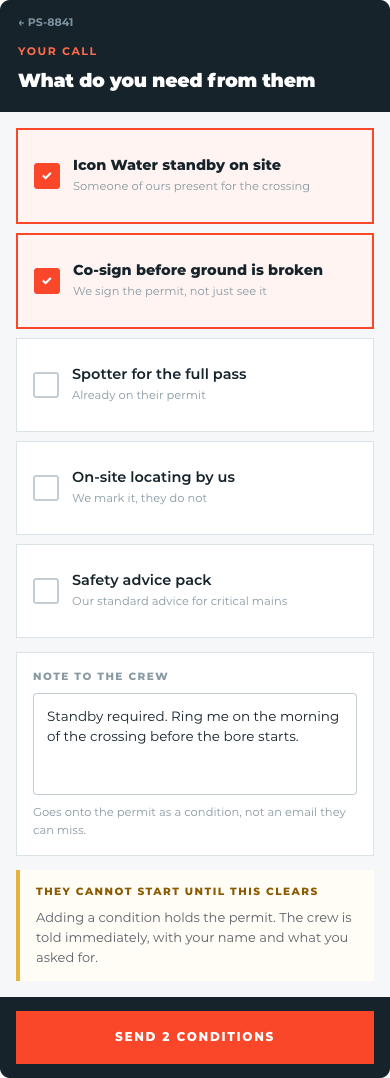
08 · Add a condition
Add a condition
Attach a condition to a specific permit without changing your standing control set. The crew sees it before they break ground.
One-off conditions on a single permit
Crew must acknowledge before work starts
Recorded against the audit trail
Mobile
Alert
Dashboard
Asset classes
Versions
Requests
Audit trail
Review
Add a condition
My network
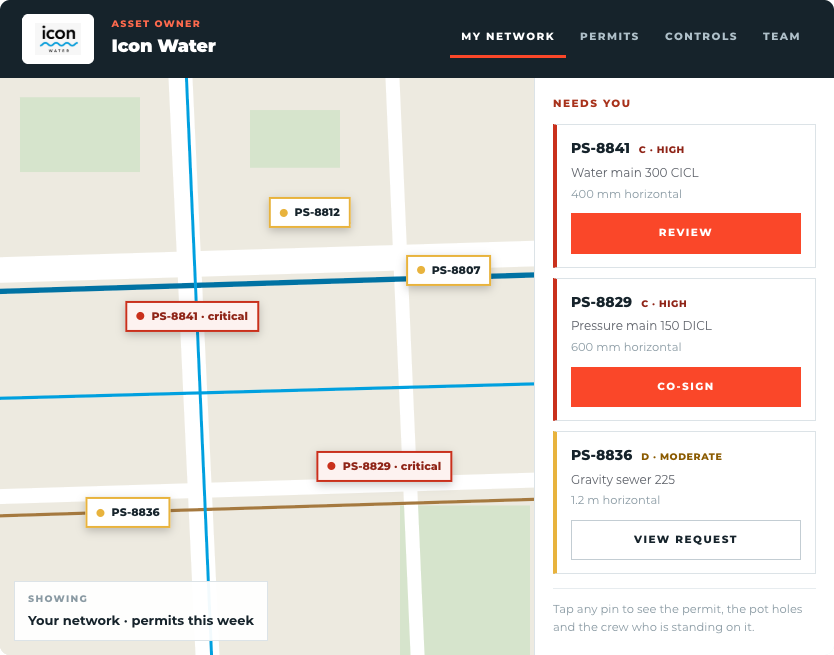
09 · My network
My network
Your assets, the permits sitting over them and the crews on site — held on one map rather than in a list.
Assets and live permits on the same view
Tap a site for the permit behind it
Works on a tablet in a vehicle
Tablet
Accreditation
Get accredited, then work with the principals who require it.
A permit is only worth what the person raising it understands. The PermitSnap accreditation course teaches the standard — risk categorisation, locating and ticket obligations, mud maps, pot holing, SWMS logic and remote sign-off — then tests it.
Pass it and your crew appears as accredited on every permit you raise, and you can be engaged by the asset owners and tier one contractors who set accreditation as a condition of work.
Course fee
$199
per person, ex GST
Delivery
Virtual classroom
Live, with a trainer
Duration
Half a day
Assessment included
Crews of six or more can book a private session. Ask about principal-funded places.
What the course covers
01
The permit standard
What an accredited electronic permit is, who relies on it, and what a signed one means in an audit.
02
Risk categorisation
How class, clearance and asset owner criteria set the rating — and why the permit works it out rather than asking you to read a table.
03
Locating and tickets
Calibration in date, USI obligations, and what the locator scan proves on the permit.
04
Mud maps and pot holing
Marking real asset data, placing plant with headings, and capturing pot holes that stand up as evidence.
05
SWMS by logic
How client SWMS clauses attach to your method and assets, and what acknowledging a control commits you to.
06
Remote sign-off
Running the video walk-through, consent to recording, and what lands on the SubSurface map as public record.
On passing
You are issued a numbered accreditation valid two years, renewable with a short refresher. It carries onto every permit you raise, so the principal can see who prepared it.
Once accredited
Work with the organisations that set the standard
Adoption targets, not current customers. None of these should be represented as a commercial relationship until formally signed.
Let's change the game
Permits done efficiently, to one industry standard, with every stakeholder bought in before the first cut.
PermitSnap
Part of SubSurface Data, with CivilSnap and SubSurface Networks.
Rowan Isaacs · 0405 373 337